Quote first. Invoice when they say yes.
A quotation is built like an invoice, with the same items and the same GST. It has a validity date, a status, and a button that turns it into the invoice.
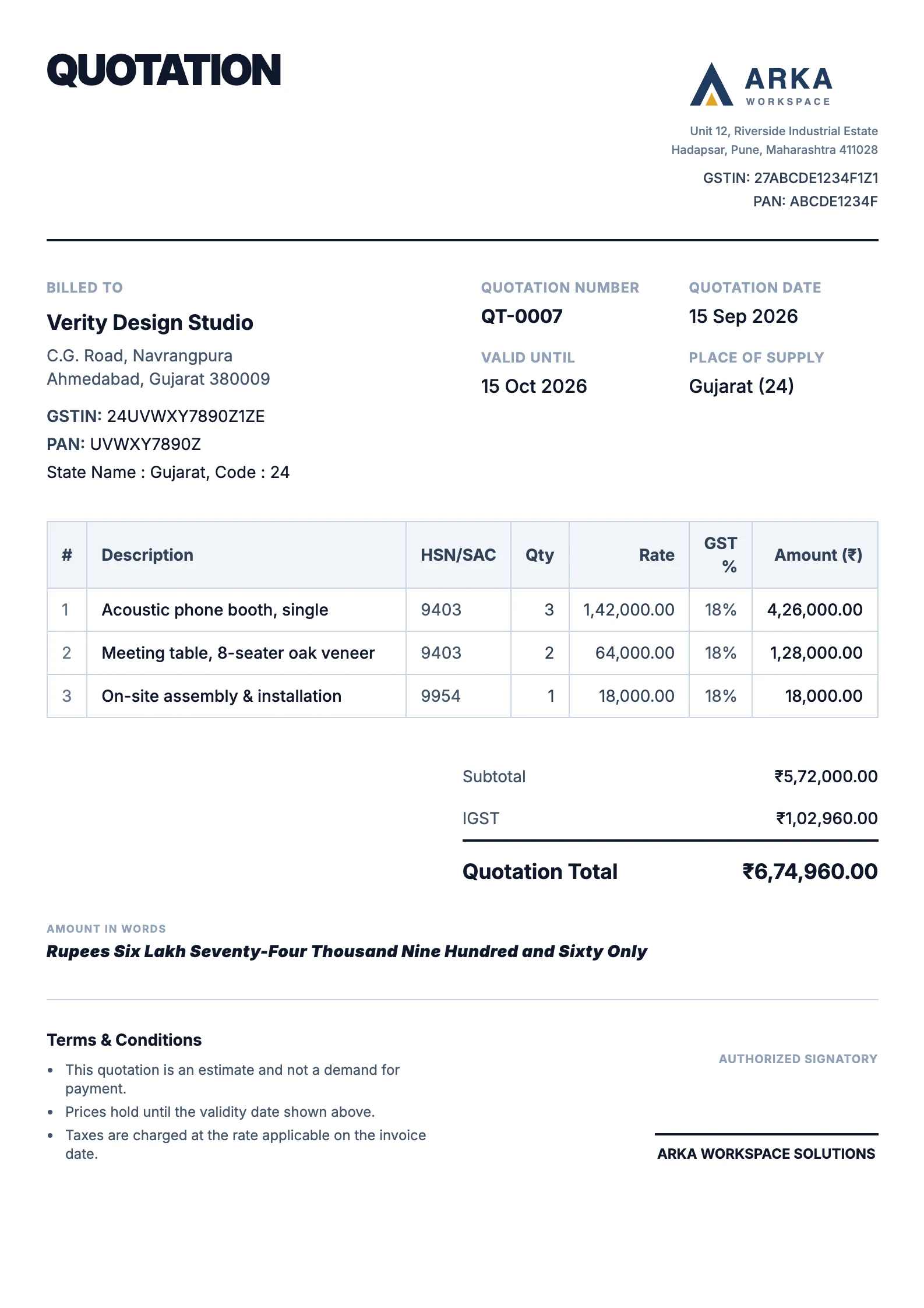
From quotation to invoice, without typing it twice.
Four steps, and the numbers never change on the way.
- 1
Write the quotation
The same form as an invoice: your client, items with HSN codes, GST, discount and shipping, and a Valid Until date.
- 2
Send it
Download it as a PDF or print it. It carries your logo and prints in your invoice design, headed Quotation.
- 3
Mark what happened
Sent, Accepted or Declined. Once Valid Until has passed, an open quotation shows as Expired by itself.
- 4
Turn it into the invoice
Pick the invoice date and due date. The number comes from your invoice series, and the amounts are copied exactly.
Every quotation, and where it stands.
The quotations list shows what is still waiting for an answer and what you have won.
Filter by status
Draft, Sent, Accepted, Declined, Expired and Converted, each with its count, and a search by number or client.
What is at stake
The value of quotations awaiting a decision, how many are open, and the value of those accepted or converted.
Expired needs no upkeep
Nobody has to mark a quotation as expired. It shows as Expired once its Valid Until date has passed, and can still be converted if the client accepts late.
Converting copies the quote, not a rough copy of it.
The client is billed exactly what they accepted, and each document points at the other.
- The same amounts
- Items, discount, shipping, currency and GST are carried over as they are. Nothing is recalculated on the way.
- A real invoice number
- The invoice takes the next number in your invoice series for the financial year, and a number already used is refused.
- The trail stays
- The quotation is marked Converted and links to its invoice, and the invoice records the quotation it came from.
What happens next.
An accepted quotation becomes an invoice, and the invoice becomes money owed.
- NextInvoicingThe invoice a quotation becomes, with the tax worked out the same way.Explore invoicing
- The designTemplatesOne design prints your quotations, invoices and notes, so they match.Explore templates
- PlansPricingQuotations are on every plan. On Free, an invoice made from one counts towards the five a month.See pricing
Questions, answered plainly.
More on the FAQ page.
Is a quotation the same as a proforma invoice?
It does the same job: a priced offer before the sale. A quotation is not a tax invoice and is not part of your GST returns. The invoice it becomes is.
How long does a quotation stay valid?
Until the Valid Until date you set. After that an open quotation shows as Expired. If the customer accepts late, you can still convert it.
What happens when I convert a quotation?
PlusGST creates an invoice with the same items, discount, charges and totals, numbered in your invoice series for the date you choose. The quotation is marked Converted and links to the invoice, and the invoice records the quotation it came from.
What if the price changed after I sent the quotation?
Converting copies the quotation exactly, so edit the quotation first, or edit the invoice after converting it.
Do quotations count towards the Free plan's invoice limit?
Creating quotations does not. Converting one creates an invoice, and that invoice counts like any other.
Do quotations print in my invoice design?
Yes. A quotation prints in the same template as your invoices, headed Quotation, with its number, date and Valid Until date. Bank details are left off.
Send your next quotation from PlusGST.
Start with the Free plan and see how PlusGST fits into your day.