Keep purchase bills with the rest of your business records.
Supplier bills sit beside your invoices: who you bought from, the tax on the bill, whether it is paid, and the bill itself attached.
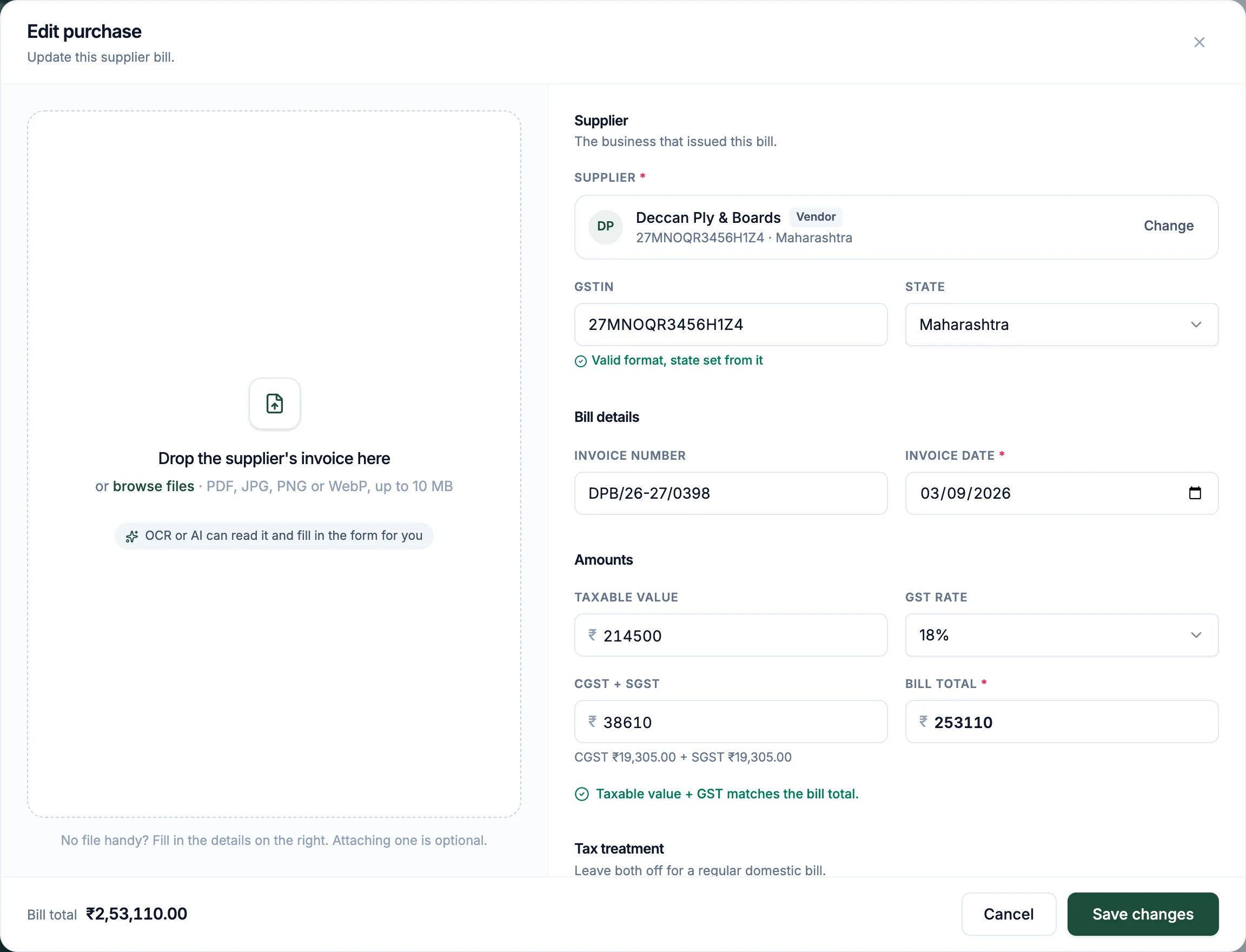
Recording a bill takes a minute.
The form does the GST arithmetic and tells you when the numbers on the bill do not add up.
- 1
Open a new purchase
From the purchases list or straight from the dashboard.
- 2
Attach the bill, if you have it
A PDF or a photo of the supplier’s invoice is kept with the record. It is optional.
- 3
Pick the supplier
Choose a vendor you have used before and the GSTIN and state come with them, or type a new one.
- 4
Enter the amounts
Taxable value and GST rate. The tax is split for you, and checked against the bill total before you save.
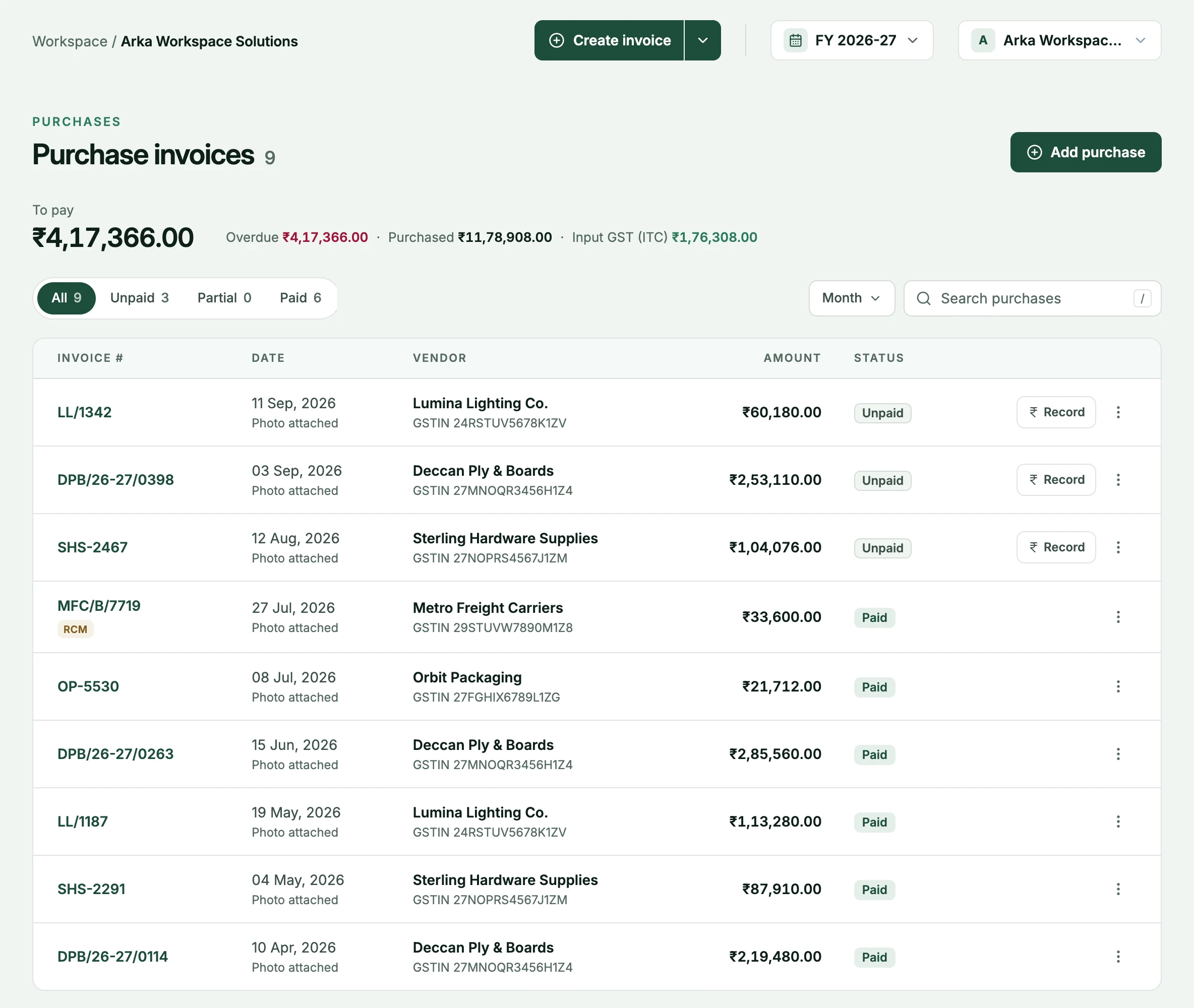
Every bill, and what is still unpaid.
The purchases list is your record of what you bought, from whom, and what you still owe for it.
- To pay, at a glance
- Total purchases, the amount still to pay and how much of it is overdue, for the month or the year.
- Input GST, totalled
- The GST on your bills is added up for the period, the figure your GSTR-3B starts from.
- Payments against bills
- Record what you have paid a vendor, in parts if needed, the same way you record what clients pay you.
The right vendor, and the right tax.
Two things quietly go wrong with purchase records. Both are checked for you.
- Vendors are matched carefully
- A bill links to a vendor automatically only on the same GSTIN or an identical name. Anything less certain is a suggestion you confirm.
- The split follows the supplier’s state
- The GSTIN sets the state, and the state decides IGST or CGST plus SGST. Taxable value plus GST must equal the bill total.
- Reverse charge is a tick box
- A reverse-charge bill is marked in the list and reported in GSTR-3B as tax you owe and as credit.
From the supplier’s bill to your GSTR-3B.
Each part of a purchase bill has a job in your books and in your return. This is where PlusGST puts it.
| On the bill | What PlusGST does with it |
|---|---|
| The supplier’s GSTIN | Links the bill to the vendor with that GSTIN, and sets the supplier’s state |
| The supplier’s state against yours | Decides CGST and SGST, or IGST |
| Taxable value and GST rate | Splits the tax, and checks taxable value plus GST against the bill total |
| The GST on the bill | Counted as input tax credit, in GSTR-3B Table 4(A)(5) |
| Reverse charge | Reported as tax you owe in 3.1(d), and as credit in 4(A)(3) |
| The bill itself, as a PDF or photo | Kept with the record, if you attach it |
| What you have paid | Payables and their ageing, vendor by vendor |
Input tax credit can be claimed only for bills your supplier has reported, which is what your GSTR-2B shows. On the reports page, the 2B statement you download from the portal is compared with the bills you recorded: matched, amounts that differ, in 2B but not in your books, and in your books but not yet in 2B.
How reverse charge works is in the reverse charge guide, and where purchases sit in the return in the GSTR-1 and GSTR-3B guide.
What you owe, by how late it is.
Unpaid bills are aged the same way your receivables are, so both sides of your cash are in one place.
- Payables ageing
- Not due, 0 to 30, 31 to 60, 61 to 90 and over 90 days, with the total to pay.
- Payable by vendor
- One line per vendor with their open bills and the balance, as a download.
- Expenses alongside
- Rent, salaries and other costs without GST are recorded as expenses, once or on a repeating schedule.
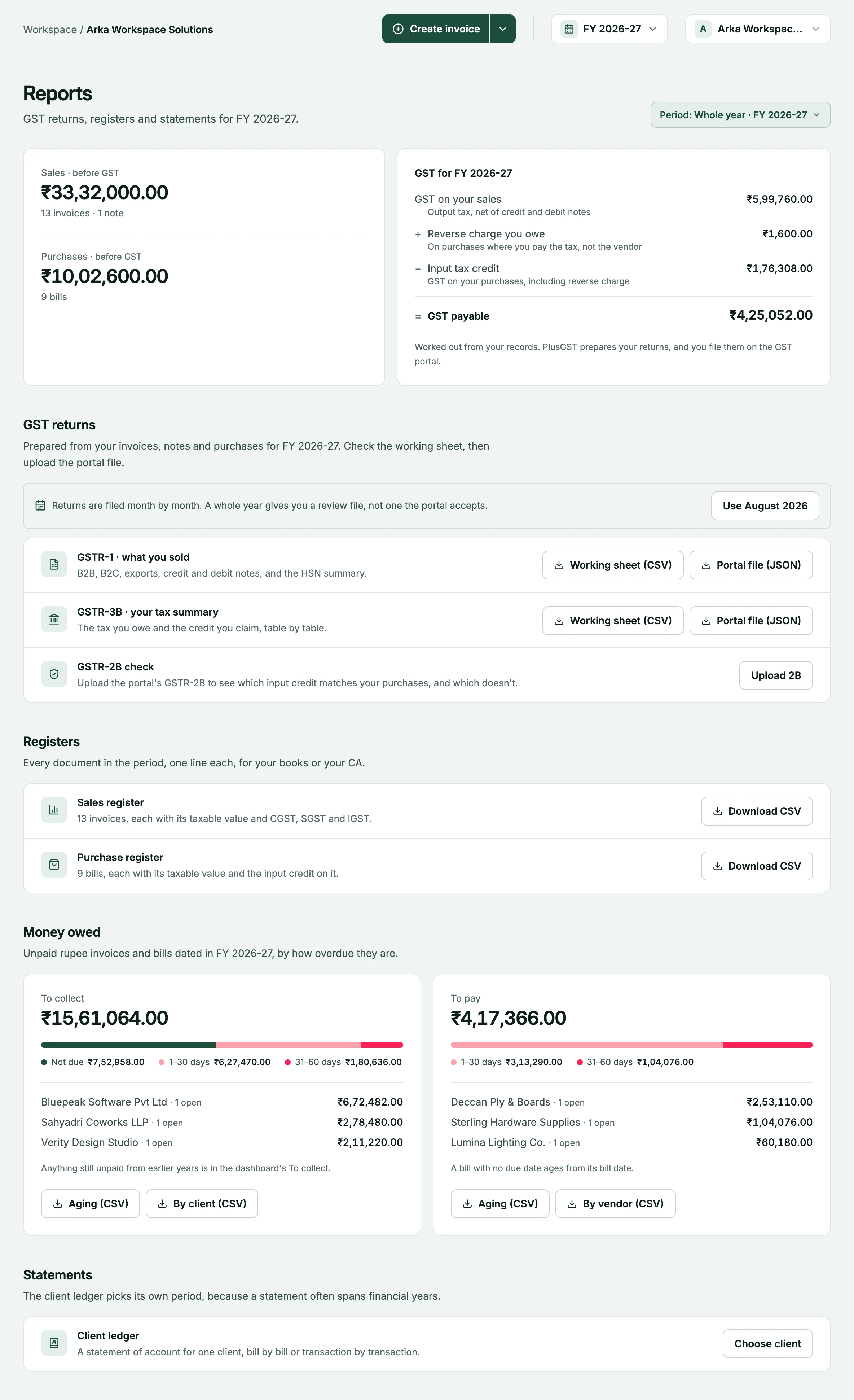
Purchases are half of your GST.
What you record here is the input side of the same return your invoices feed.
- NextGST reportsPurchase bills carry the input tax and reverse-charge entries into GSTR-3B.Explore GST reports
- The other sidePaymentsWhat clients owe you, tracked and aged the same way.Explore payments
- PlansPricingTyping bills in is on every plan. Reading them from a photo is on Pro and Business.See pricing
Questions, answered plainly.
More on the FAQ page.
Do I have to attach the supplier's bill?
No. Attaching the file is optional; you can record a purchase from the details alone. When you do attach one, PDF, JPG, PNG and WebP files up to 10 MB are accepted.
Can PlusGST read the bill for me?
On the Pro and Business plans a bill can be read from a PDF or a photo to fill in the form, and you check the fields before saving. On Free, bills are typed in by hand.
How does it know which vendor a bill belongs to?
A bill is linked automatically only when the GSTIN matches a vendor you already have, or the name is identical. Anything less certain is offered as a suggestion for you to confirm.
How is the tax on a bill split?
From the supplier's GSTIN or state: the same state as yours gives CGST and SGST, a different state gives IGST. PlusGST also checks that taxable value plus GST equals the bill total.
What about reverse-charge bills?
Mark the bill as reverse charge. It is flagged in your purchases and reported in GSTR-3B as tax you owe and as credit.
Where do costs without GST go?
In Expenses, which sits beside Purchases. Rent, salaries and similar costs are recorded there, once or on a repeating schedule.
Put this month’s bills where your invoices are.
Start with the Free plan and see how PlusGST fits into your day.