GST returns built from your clients’ own entries.
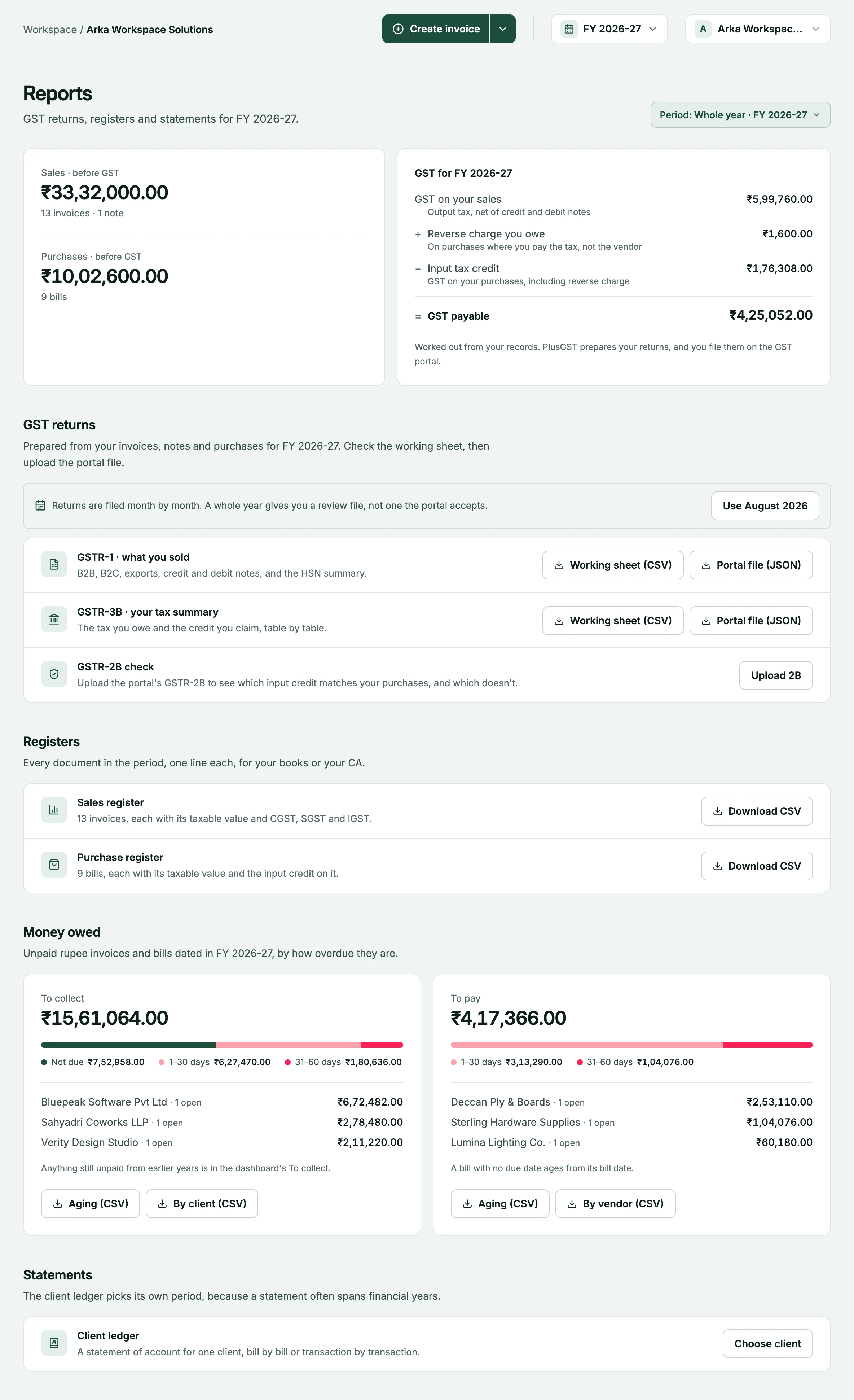
When a client raises invoices and records purchase bills in PlusGST, their GSTR-1 and GSTR-3B come from those same entries: a CSV working sheet for you to reconcile, and the JSON the GST offline tool imports.
PlusGST prepares return files. It does not file returns or connect to the GST portal.
How it works when a client uses PlusGST.
Your client does the day-to-day entry. You pick up return files that were built from it, not typed in again.
- 1
Your client works in PlusGST
They raise tax invoices, quotations and credit notes, and record purchase bills and expenses. The GST is worked out as they go.
- 2
You get access, or the files
On the Business plan your client can invite you into their business. On any plan they can download the files and send them to you.
- 3
Reconcile the working sheet
Each return comes as a CSV to read and check, built from the same calculation as the upload file, so the two cannot disagree.
- 4
You file
Import the JSON into the GST offline tool and complete the filing on the portal. PlusGST prepares the files and never signs in to the portal.
What a client’s PlusGST gives you.
Everything on the reports page follows the period you pick, and downloads as a file you can open anywhere.
- GSTR-1 and GSTR-3B
- Each as a CSV working sheet and as the JSON the offline tool imports. GSTR-1 covers B2B, B2C, exports, credit and debit notes and the HSN summary.
- Registers and ageing
- Sales and purchase registers with the tax split on every row, receivables and payables ageing, and the balance for each client and vendor.
- A GSTR-2B check
- Upload the portal’s 2B statement to see which input credit matches the purchases recorded, which differs, and what is missing on either side.
- Tally vouchers
- A financial year’s sales and purchases, exported for TallyPrime or Tally.ERP 9.
What each return contains is set out in the GST reports guide, and the screens on the GST reports page.
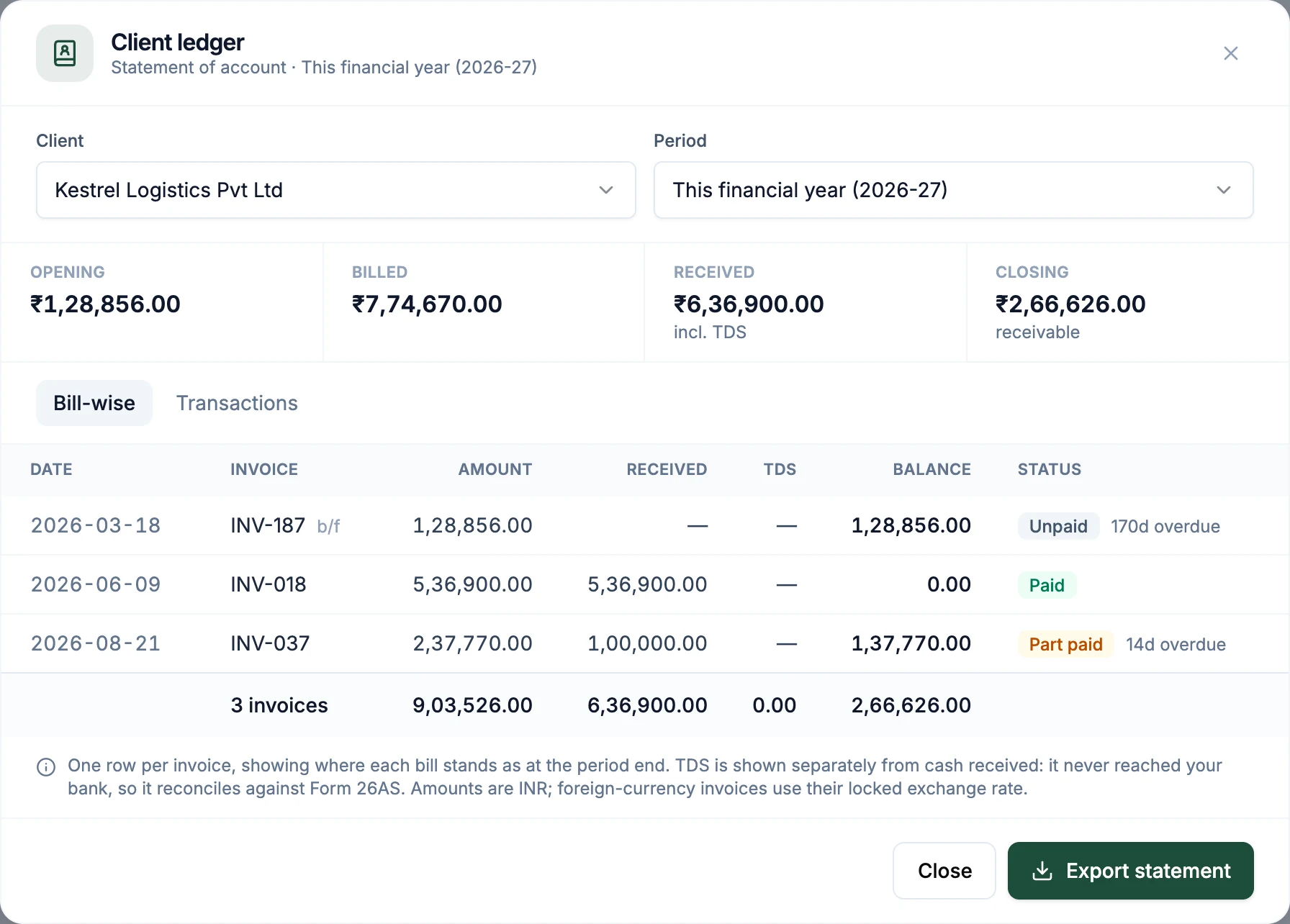
Statements that reconcile.
When a client’s customer disputes a balance, the ledger is already there.
- Opening, billed, received, closing
- A statement of account for any customer and any period, bill-wise or as a list of transactions, exported in one click.
- TDS kept apart from cash
- TDS a customer deducted settles the invoice but is shown separately from money received, so it can be matched against Form 26AS.
The awkward cases, handled where the entry is made.
These are decided when an invoice or a bill is saved, so they reach the files without a fix in the sheet.
- Place of supply by state code
- IGST, or CGST and SGST, follows the GST state codes of the two parties, not how a state’s name was typed.
- Reverse charge, both sides
- A reverse-charge purchase is reported in GSTR-3B as tax payable and as input credit, not just as the credit.
- Credit and debit notes
- A note adjusts the month it was raised in, and registered and unregistered recipients are reported separately.
- Numbers in series
- Invoice numbers run in a series within the financial year, and a number already used in that year is refused.
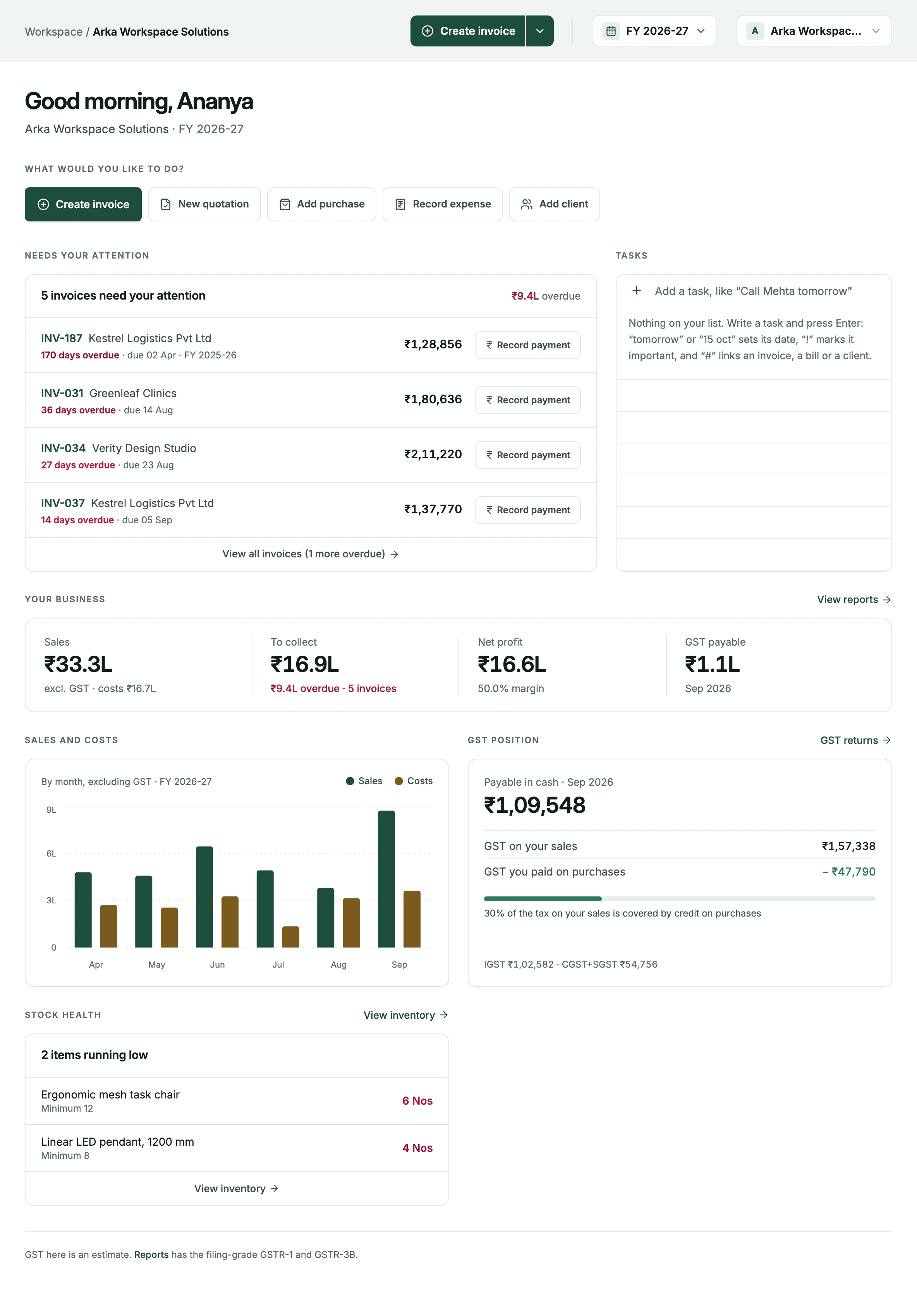
Access that fits the engagement.
You see a client’s books in their own workspace, on the terms they set.
- Invited by the owner
- The business owner invites you from their team settings. Inviting teammates is part of the Business plan.
- A role, or chosen sections
- Admin, editor or viewer, or custom access to the sections the owner picks. A viewer can read what they are given and change nothing.
- Several clients, one sign-in
- Every business that invites you appears in the business switcher at the top of the app, with its own books, numbering and reports.
- Who changed what
- Each business keeps an activity log that nobody can edit or delete, the owner included. Reading it needs view access to every section.
How access is enforced is on the security page.
What PlusGST does not do.
It prepares return files; it does not file them or connect to the GST portal. It does not issue e-invoices or e-way bills today, and it does not prepare composition-scheme returns. Review every file before it is uploaded: it is built from what was entered.
Looking after several clients?
If you keep the books or file the returns for a number of businesses and would like to talk about using PlusGST with them, send us a note. Tell us about your practice and how your clients invoice today.
Questions, answered plainly.
More on the FAQ page.
Does PlusGST file returns for my clients?
No. It prepares the GSTR-1 and GSTR-3B files from your client's entries. You upload them and complete the filing on the GST portal. PlusGST does not sign in to the portal.
Does my client need a paid plan for me to see their books?
To invite you into their business, yes: inviting teammates is part of the Business plan. On any plan, Free included, your client can download the GST files and registers and send them to you.
Can I have read-only access?
Yes. Your client can invite you as a viewer, who can read what they are given and change nothing, or give you custom access to the sections they choose.
Can I look after several clients from one login?
Yes. Every business that invites you appears in the business switcher at the top of the app, and each keeps its own books, invoice numbering and reports.
Can the data go into Tally?
Yes. A financial year's sales and purchases can be exported as Tally vouchers for TallyPrime or Tally.ERP 9. The export needs view access to invoices and purchases.
Is the JSON ready to upload without checking?
No file should be. Open it in the GST offline tool and reconcile it against the working sheet before you submit. The files are built from what was entered, so a missing bill or a wrong GSTIN will be in them too.
See what your clients would see.
Create a free account and look around. The Free plan does not expire.