Skip to content

Create GST invoices.Track payments.Stay on top of GST.

Make GST invoices, see what you’re owed, record purchases, and export your GSTR-1 and GSTR-3B files from the same entries.

Up to 5 invoices a month on the Free plan. Paid plans from ₹299 a month.
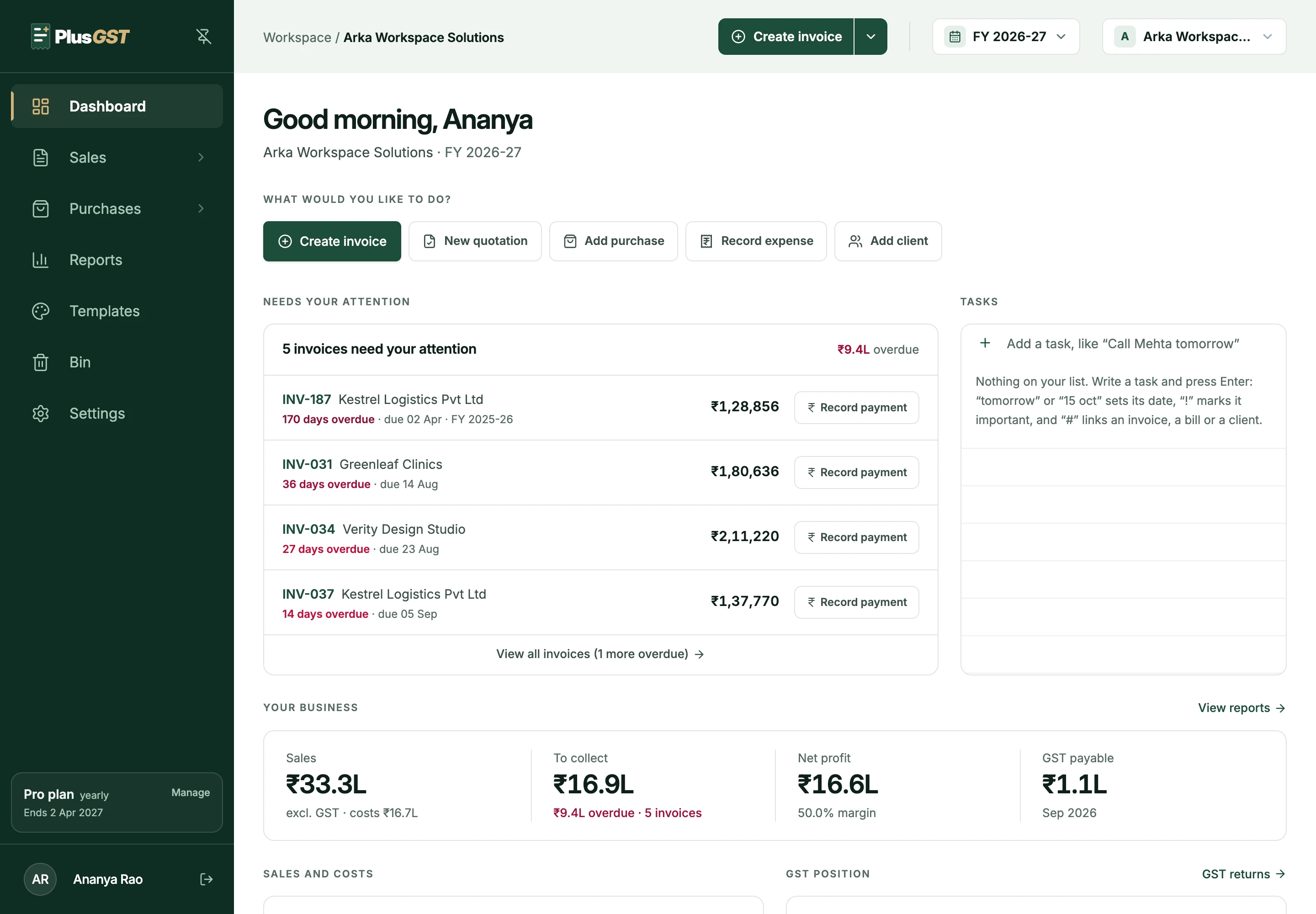
The PlusGST dashboard: a greeting, buttons to create an invoice or a quotation, add a purchase, record an expense or add a client, five invoices that need attention with ₹9.4 lakh overdue and a Record payment button on each, a task list, and the year's sales, money to collect, net profit and GST payable.
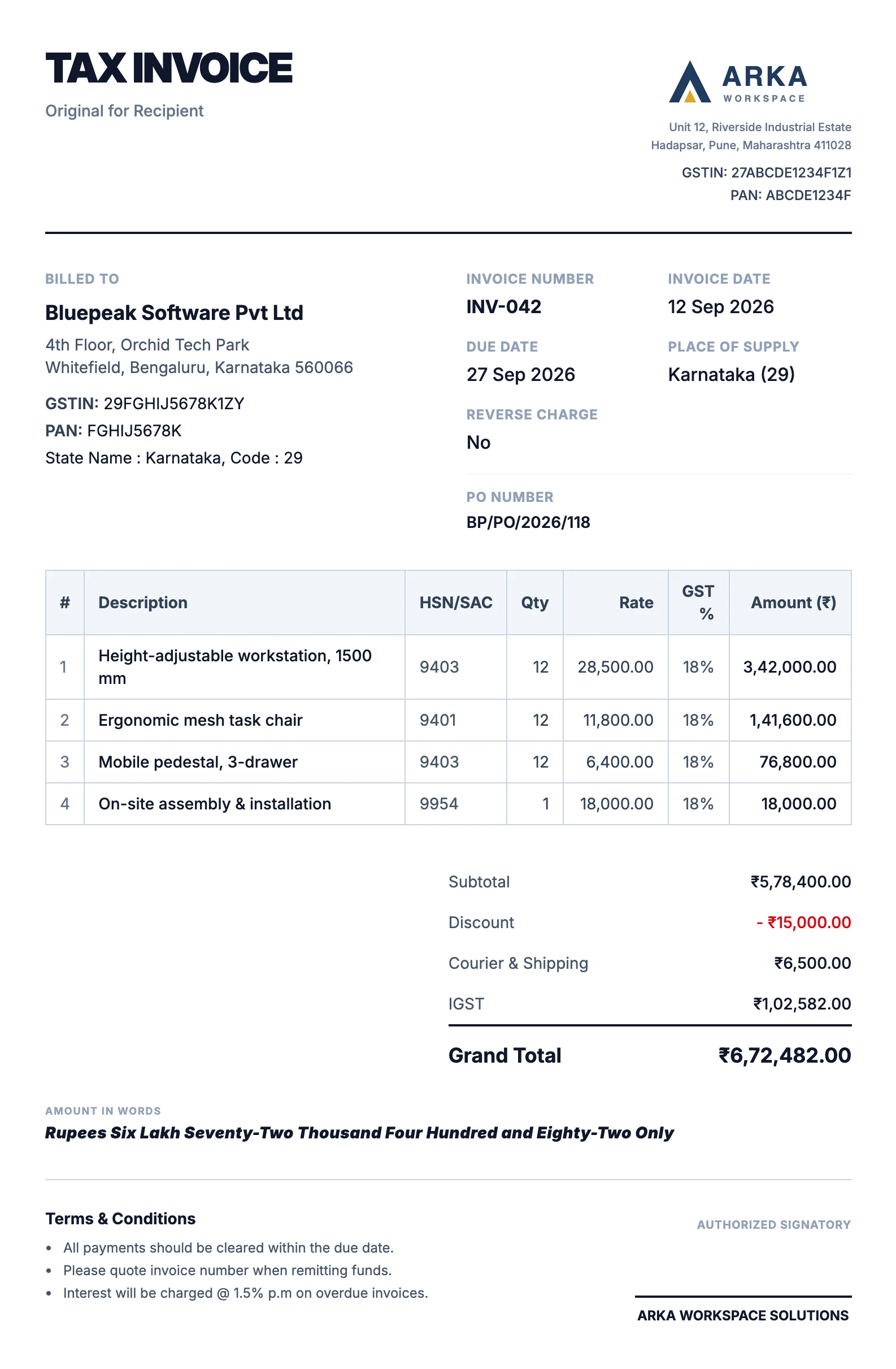
A tax invoice in the Modern template: a large TAX INVOICE heading, the business logo at the top right, billed-to details, a bordered item table with HSN codes, and totals with IGST, the grand total and the amount in words.
  • GST invoicing
  • Quotations
  • Payments
  • Purchases
  • Inventory
  • GST reports

Create the invoice. We’ll handle the GST math.

Pick the customer and add what you sold. PlusGST works out the tax, keeps your invoice numbers in series, and shows the finished invoice beside the form as you type.

See invoicing

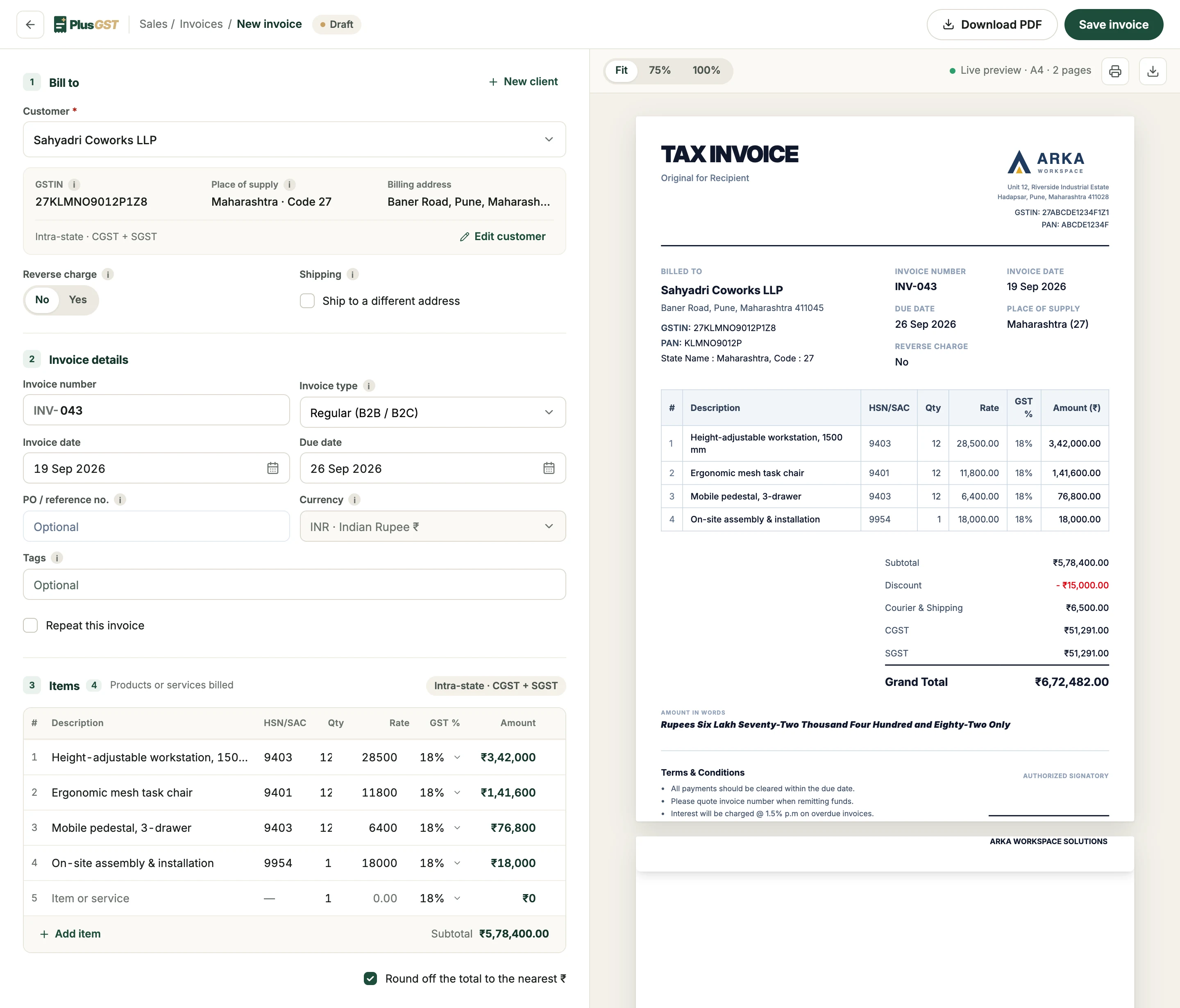
Maharashtra to Karnataka: the whole 18% is charged as one IGST line.
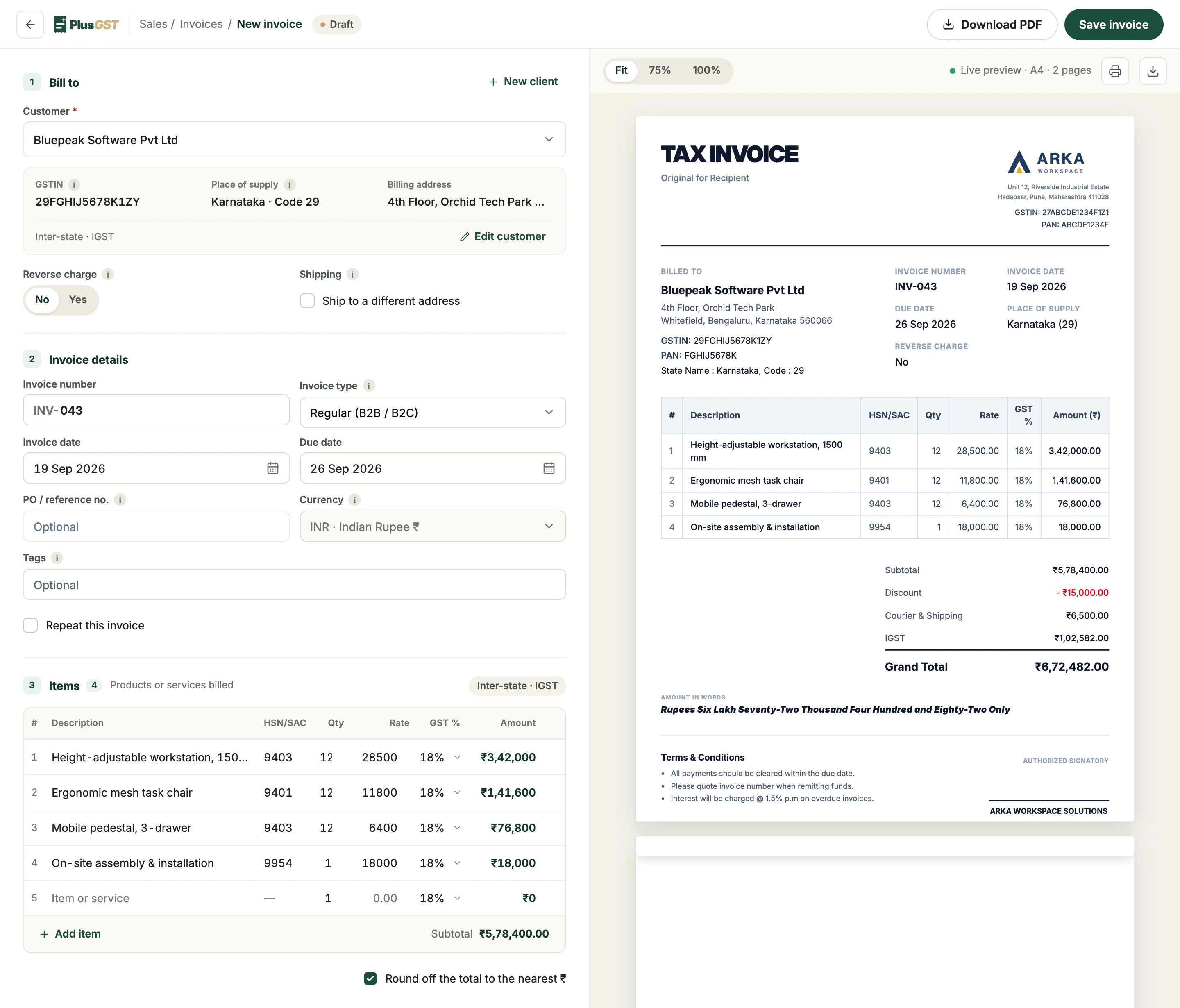
The PlusGST invoice builder. A customer in Karnataka is billed by a business in Maharashtra, so the supply is marked inter-state, IGST: the invoice details and four line items with HSN codes, quantity, rate and 18% GST fill the form, and the live preview beside it shows the finished tax invoice with a ₹15,000 discount, ₹6,500 courier and shipping, IGST of ₹1,02,582, a grand total of ₹6,72,482 and the amount in words.
IGST, or CGST and SGST
Decided from the two GST state codes, not from how someone typed a state name.
Discount before tax
An invoice discount lowers the taxable value first. GST is charged on what is left.
Totals that add up
Every line is rounded so the printed lines foot to the printed total, round-off shown.
Amount in words
Written out in rupees on the invoice, the way a tax invoice is expected to carry it.

Make every invoice look like your business.

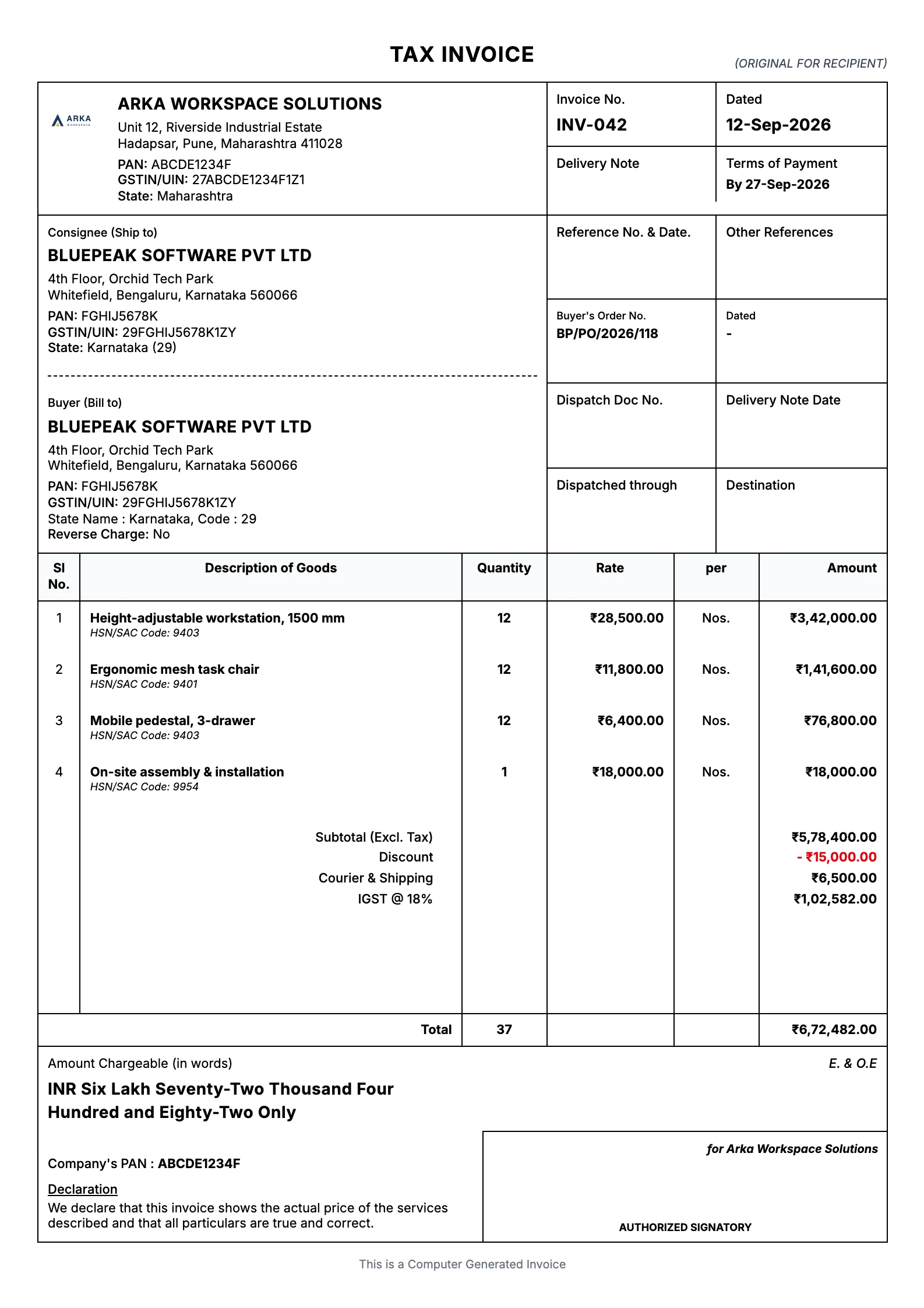
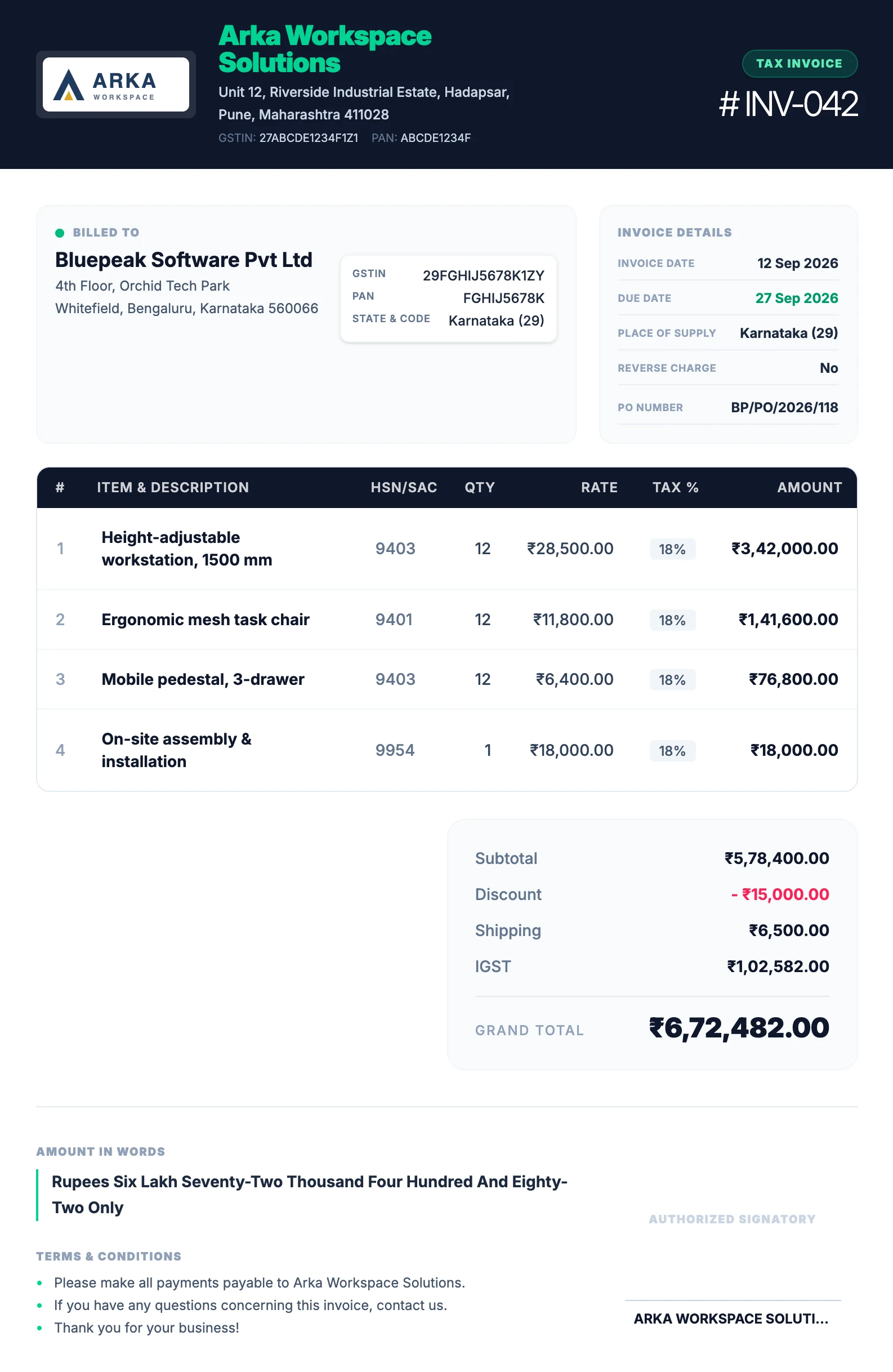
Three designs, one set of numbers. Add your logo and signature once. The same design prints your quotations and credit notes, so everything you send matches.

Clean and roomy, with your logo up top. On every plan, Free included.

See all templates
A tax invoice in the Modern template: a large TAX INVOICE heading, the business logo at the top right, billed-to details, a bordered item table with HSN codes, and totals with IGST, the grand total and the amount in words.

From invoice to payment.

See what is due, what is overdue, and what has already been paid.

Explore payments
Part payments, kept as a history
Record each payment with its date and method. The invoice moves from Unpaid to Partial to Paid by itself.
TDS counts as settled
When a client deducts TDS, record it with the payment and the invoice still closes.
Old dues don’t vanish on 1 April
Invoices still unpaid from earlier years stay in what you have to collect.
A ledger for every client
Invoices, payments and the balance for any period, ready to send when someone asks what they owe.
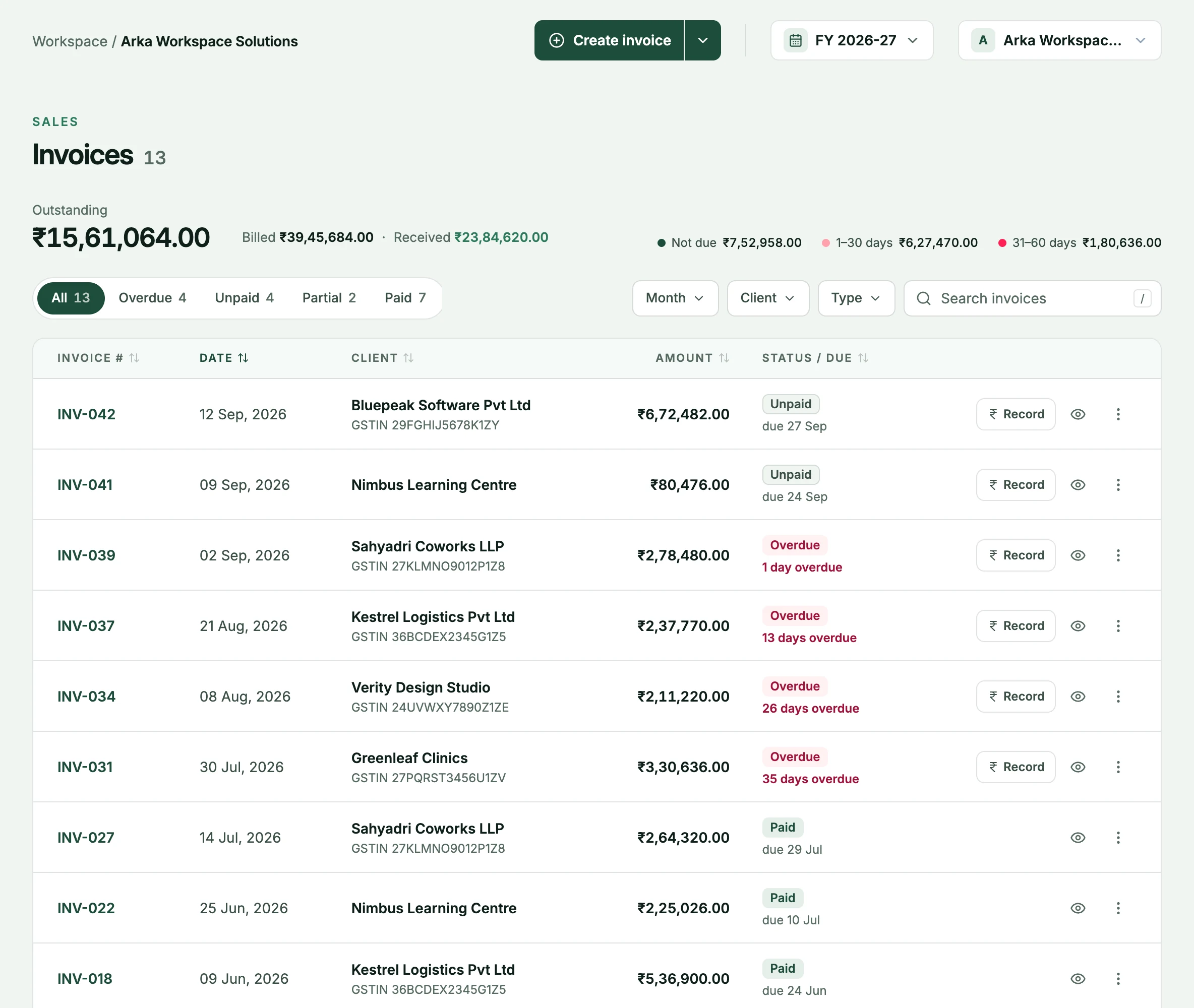
The PlusGST sales list: ₹15,61,064 outstanding for the year beside the amounts billed and received and how overdue it is, tabs for overdue, unpaid, part-paid and paid invoices, and every invoice with its client, amount, status and due date, with a Record button on those still owed.
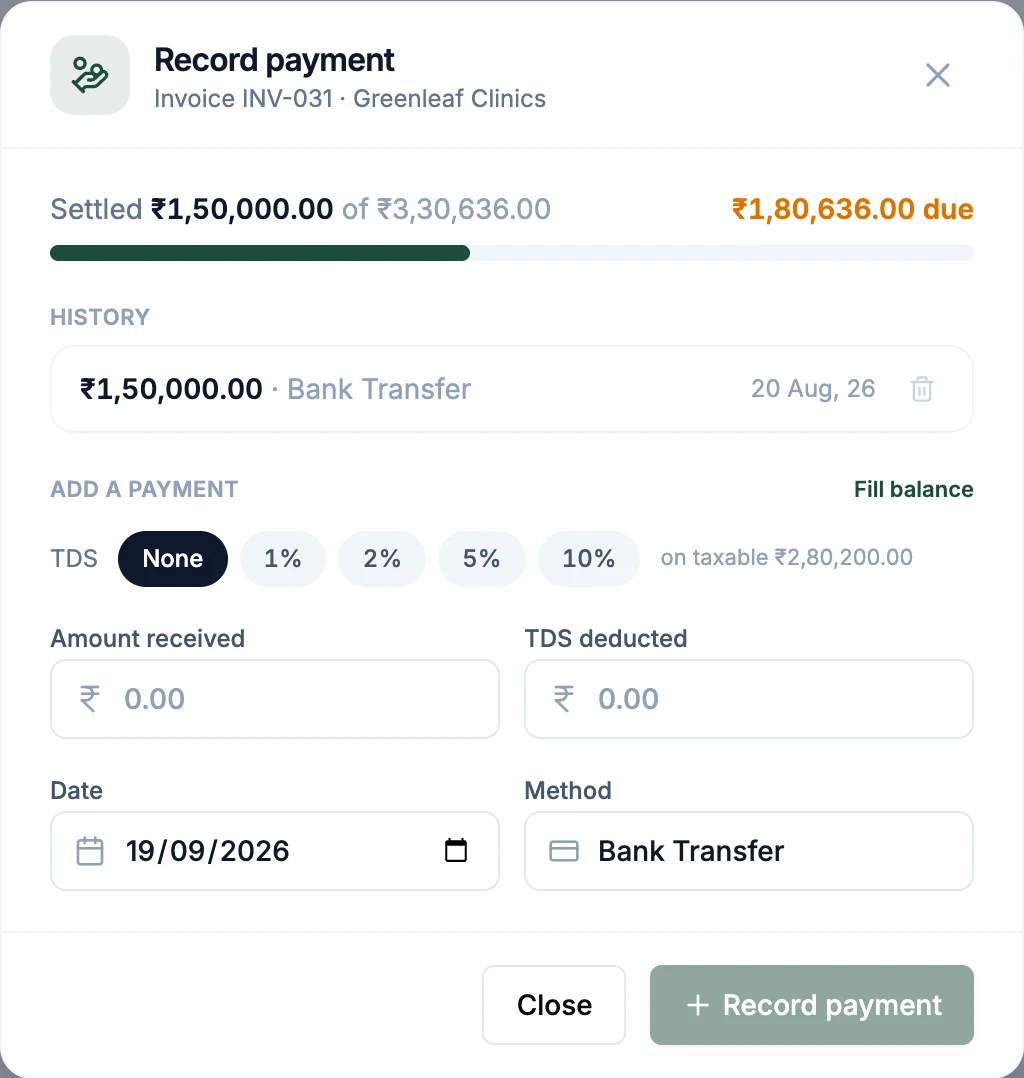
The Record payment window for one invoice: ₹1,50,000 settled of ₹3,30,636, one earlier bank transfer in the history, TDS options, and fields for the amount received, TDS deducted, date and method.

Your GST reports start with the invoices you already made.

Nothing is entered twice. The sales, purchases and credit notes already in PlusGST are what your returns are built from.

Export the files. You or your CA upload them.PlusGST prepares your returns. It does not file them or sign in to the GST portal for you.

See GST reports
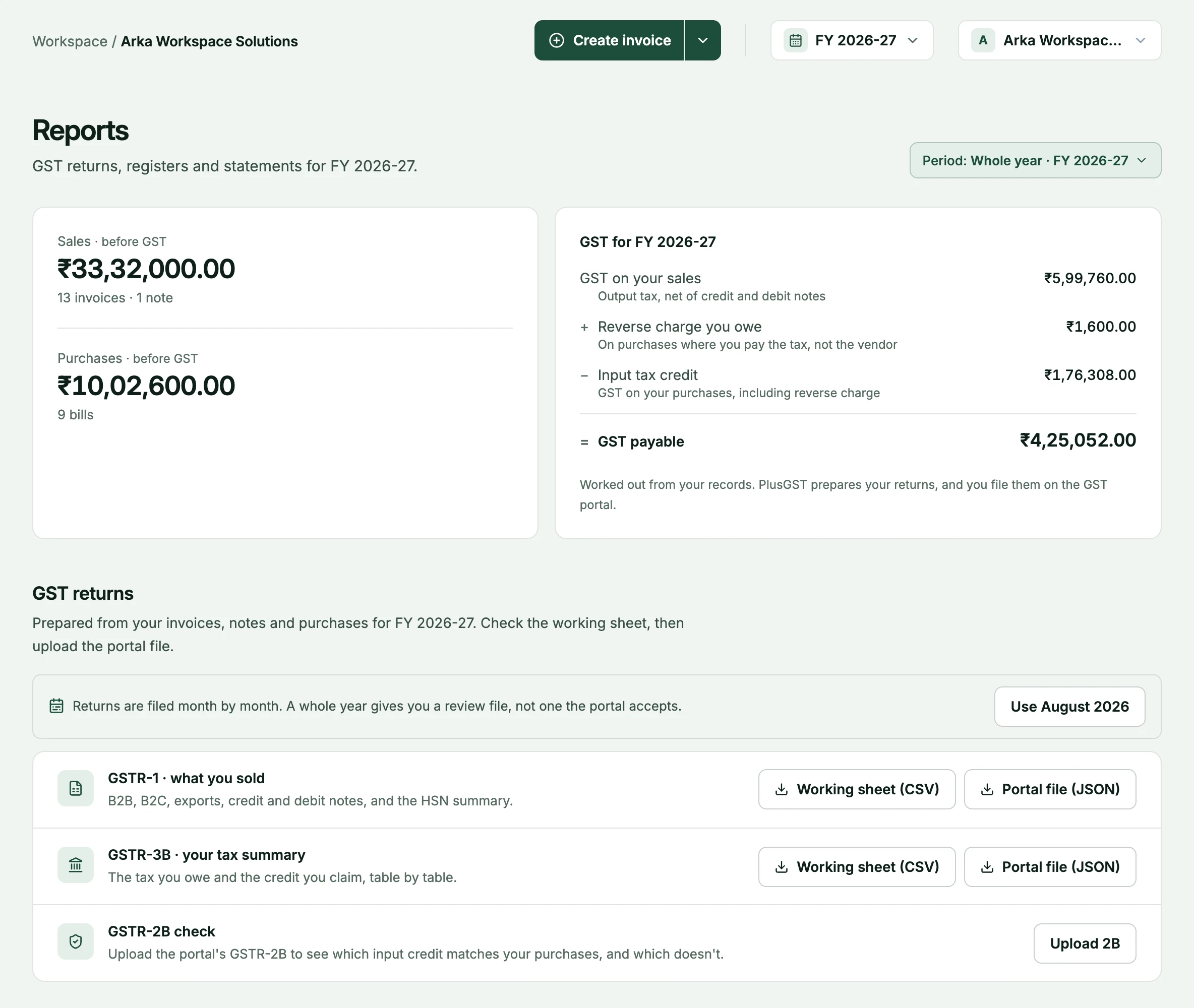
GSTR-1 and GSTR-3B
A CSV to go through with your CA, and the JSON the GST offline tool imports. Both come from the same calculation.
Credit notes and reverse charge included
Returns reduce the month they were raised in. A reverse-charge bill is reported as tax you owe and as credit you claim.
Check your input credit against 2B
Upload the portal’s GSTR-2B statement to see which purchase credit matches and which does not.
The GST card on the reports page: GST on sales, reverse charge and input tax credit for the year, coming to ₹4,25,052 payable.

Record purchases without starting from scratch.

Attach the supplier’s bill and pick a vendor you have bought from before. The GSTIN sets the state, the state sets the tax split, and PlusGST checks that taxable value plus GST matches the bill total before you save.

Explore purchases
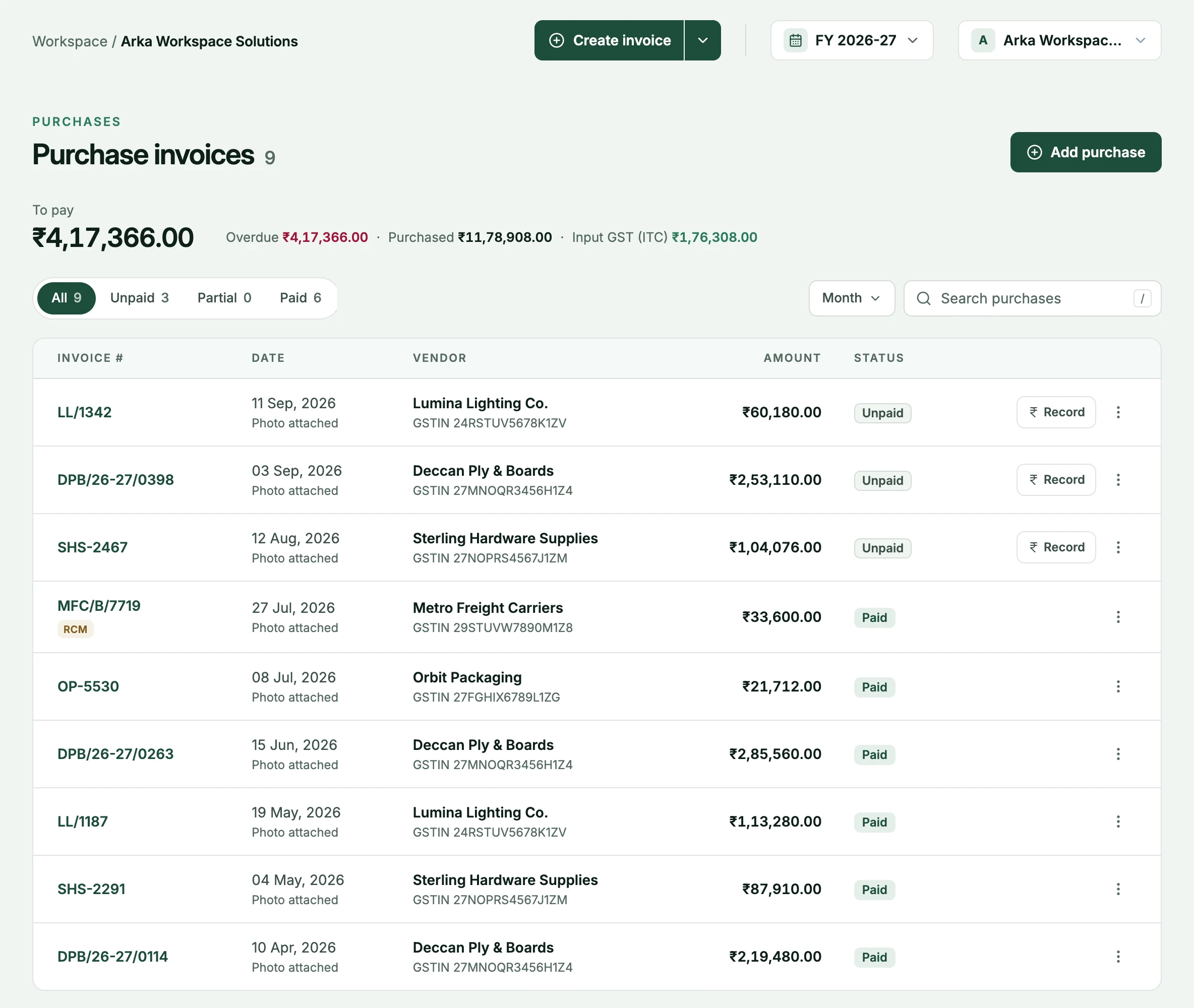
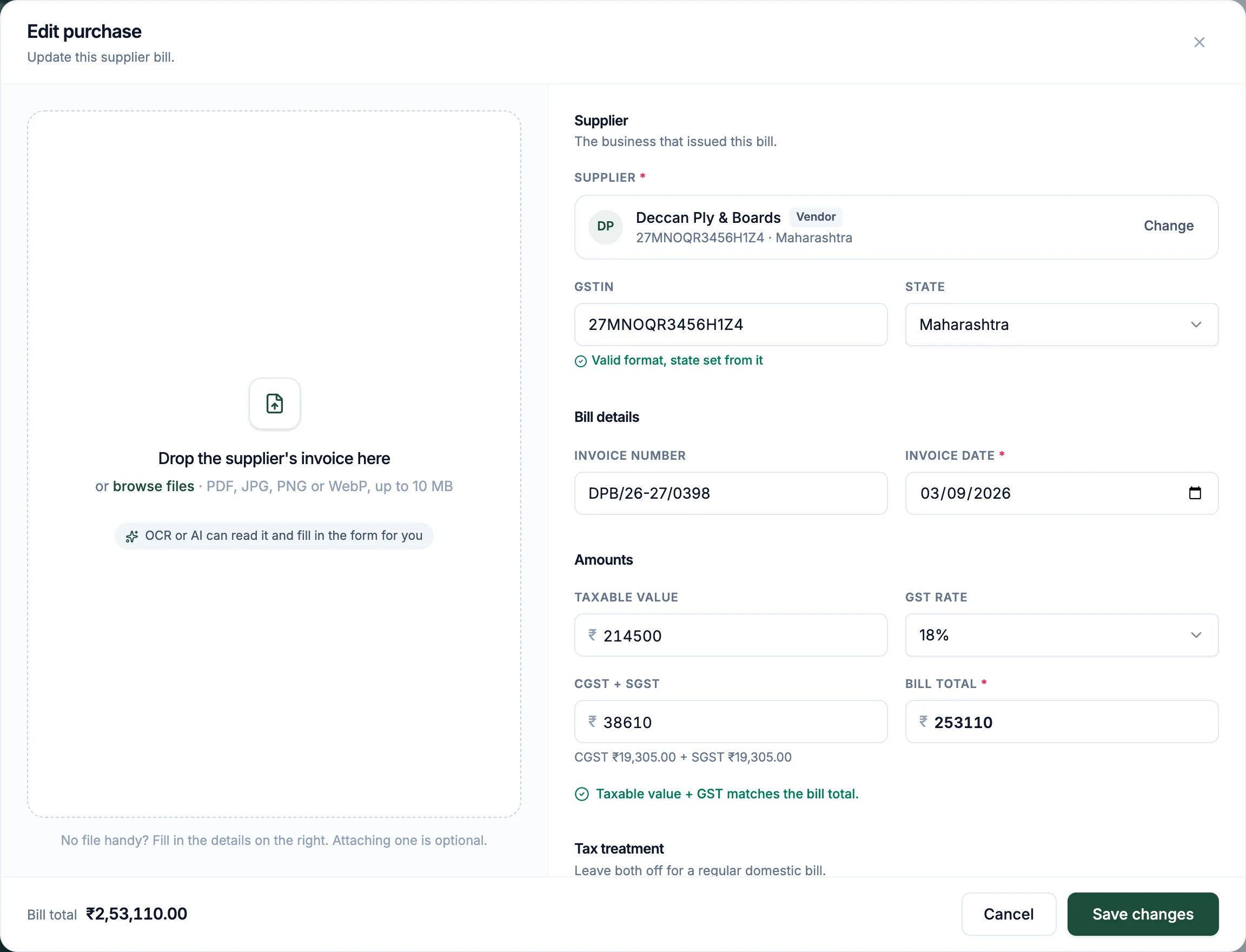
The PlusGST purchase form: a place to attach the supplier's bill beside the vendor, its GSTIN and state, the bill number and date, the taxable value at 18% split into CGST and SGST, and a note that taxable value plus GST matches the bill total.
Input credit adds up as you go
Every bill’s GST is totalled as recoverable credit for the period.
Reverse charge is flagged
Mark a bill as reverse charge and it is carried into GSTR-3B on both sides.
Know what you still owe
Unpaid bills are aged by vendor, the same way your receivables are.

It does more than invoicing.

Invoicing is where most businesses start. The same account also keeps your purchases, stock, receivables and GST working papers, per financial year.

Sales

  • GST tax invoices
  • Quotations that convert to invoices
  • Credit and debit notes
  • Recurring invoices
  • Export invoices in foreign currency

Payments

  • Part payments with a history
  • TDS recorded with the payment
  • Overdue tracking and ageing
  • Outstanding by client
  • Client ledger statements

Purchases

  • Purchase bills with the file attached
  • Expenses, one-off and recurring
  • Vendors matched by GSTIN
  • Payables ageing by vendor
  • Bill reading from a photo, on paid plans

GST

  • GSTR-1 as CSV and JSON
  • GSTR-3B as CSV and JSON
  • GSTR-2B reconciliation
  • Reverse charge (RCM)
  • Sales and purchase registers
  • Tally export

Business

  • Inventory with low-stock alerts
  • Several businesses, one login
  • Financial years, April to March
  • Team roles, on Pro and Business
  • Activity log

Made for the way an Indian business actually bills.

  • Built for GST businesses

    CGST, SGST and IGST are part of making the invoice, not a box you fill in afterwards. HSN codes, place of supply and the amount in words are on every design.

  • One entry, more visibility

    The invoice you send is the same record that shows up in what you are owed, on your dashboard and in your GSTR-1. Nothing is keyed in a second time.

  • Invoices you would be glad to send

    Three real designs that carry your logo and signature, and print your quotations and credit notes the same way.

  • Pricing you can read

    A Free plan and two paid plans, with every price and limit written on this page.

  • More than one business

    On a paid plan, run several GSTINs from one login. Each business keeps its own clients, numbering and books.

What you can check for yourself.

There are no customer logos or review scores on this page. These are things about the product that you can verify once you are inside it.

The tax math is tested
The GST calculation is covered by automated tests, including discounts, freight and round-off.
Your dashboard and your return agree
The figures on the dashboard come from the same calculation as your GSTR-3B, and a test fails if they ever differ.
An issued invoice stays as issued
Each invoice keeps its own copy of your business details, so it prints the same next year even if your address or design changes.
Every change leaves a trail
The activity log records who did what. Its entries cannot be edited or deleted, by anyone.
You decide who sees what
Owner, admin, editor and viewer roles. A viewer can read the books and change nothing.
Two-step sign-in
Protect your login with an authenticator app.

A Free plan, and two prices you can see.

Free is a plan, not a trial. Move to a paid plan when you send more invoices, run a second business or want your bills read for you.

Free

For getting started

₹0a month

Nothing to pay, monthly or yearly

  • Up to 5 invoices a month
  • 1 business
  • 1 invoice template
  • GST reports (GSTR-1, GSTR-3B)
  • Purchase bills typed in by hand

Pro

Recommended

For a business that invoices every week

₹299a month

or ₹2,999 a year, which saves ₹589

  • Unlimited invoices
  • Multiple businesses
  • Team roles for up to 3 people
  • Unlimited OCR bill reading
  • 5 AI bill reads a month (60 a year on yearly)
  • More invoice templates
  • Bin: restore anything deleted, for 30 days
  • Priority support

Business

For teams and a busy purchase desk

₹999a month

or ₹9,999 a year, which saves ₹1,989

  • Everything in Pro
  • 50 AI bill reads a month (600 a year on yearly)
  • Premium invoice templates
  • Team roles for up to 10 people
  • Dedicated support

Compare the plans in full. Prices are in Indian rupees. One plan covers every business you own. Paid plans renew through Razorpay autopay, and you can turn autopay off from your profile at any time: the plan then runs to the end of the period you have paid for.

Questions, answered plainly.

The longer answers are in the guides: what a GST invoice has to carry and GSTR-1 and GSTR-3B, explained.

What is PlusGST?

PlusGST is GST invoicing and light bookkeeping software for Indian businesses. You create tax invoices, quotations and credit notes, record purchases and expenses, keep track of what clients owe you, and export your GSTR-1 and GSTR-3B files.

Who is PlusGST for?

GST-registered small businesses in India where the owner or a small team raises the invoices themselves: traders, manufacturers, agencies, consultants and other service firms. You do not need to be an accountant to use it.

Does PlusGST calculate CGST, SGST and IGST?

Yes. It compares the GST state codes of your business and your customer. In the same state the tax is split into CGST and SGST; across states it is charged as IGST. An invoice discount is applied before tax, and export invoices carry no GST.

Can I track payments?

Yes. Record full or part payments against an invoice, including TDS a client deducted. The dashboard shows what is due and what is overdue, and the reports give you receivables ageing, outstanding by client and a ledger for each client.

Can I export GSTR-1 and GSTR-3B? Does PlusGST file my returns?

You can download GSTR-1 and GSTR-3B for a period as a CSV to review and as the JSON the GST offline tool imports. PlusGST does not file returns and does not connect to the GST portal. You or your CA upload the files.

Does PlusGST generate e-invoices or e-way bills?

Not at the moment. PlusGST does not issue IRNs or e-way bills today. If your turnover requires e-invoicing, you will need to generate those separately for now.

Is there a Free plan?

Yes. Free is a plan, not a trial. It includes up to 5 invoices a month, 1 business, 1 invoice template, along with the GST reports. Pro is ₹299 a month or ₹2,999 a year, and Business is ₹999 a month or ₹9,999 a year.

Can I manage more than one business?

On the Pro and Business plans, yes. Add each business with its own GSTIN and switch between them from the top bar. Each keeps its own clients, invoice numbering and reports, and one subscription covers every business you own.

Ready to make your next invoice?

Start with the Free plan and see how PlusGST fits into your day.